
ID Card Print – Auto Crop & Print PDF (85.6×54 mm)
Steps: Upload > Check > Download
- Size
- 85.6 × 54 mm
- Resolution
- 300 DPI
- Pixels
- 1011 × 638
- Output
- A4 / PVC PDF
or drop the file here · PDF, JPG or PNG · nothing is uploaded
Your scan
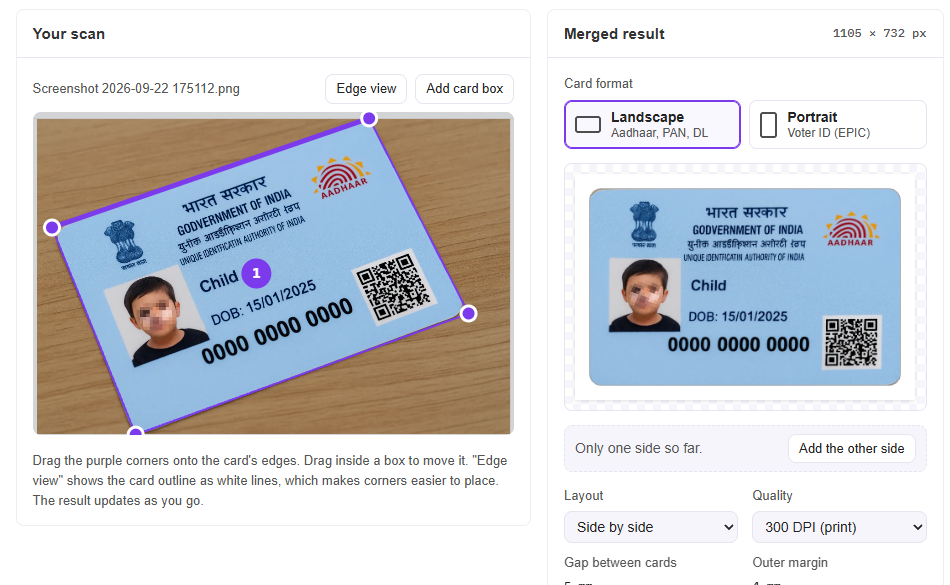
ExampleDrag the purple corners onto the card's edges. Drag inside a box to move it. "Edge view" shows the card outline as white lines, which makes corners easier to place. The result updates as you go.
How to crop & print an ID card at 85.6 × 54 mm
To print your Aadhar, PAN, voter ID or driving licence at the right size, follow these simple steps:
- 1Upload the card
Upload an e-Aadhaar PDF, a scanned PDF or a phone photo. Enter the password if asked.
- 2Check the crop
Front and back are found and straightened automatically. Drag a corner only if needed.
- 3Choose layout
Landscape or portrait card, side by side or one below the other, with a cutting outline.
- 4Download & print
Download the PDF and print at 100% / Actual size, not "Fit to page".
Correct ID card print size
Aadhar, PAN, voter ID and driving licence cards all use the standard ID-1 size of 85.6 × 54 mm (the same as a bank card). At 300 DPI that is 1011 × 638 pixels.
| Card | Format | Print size | Pixels at 300 DPI |
|---|---|---|---|
| Aadhar card | Landscape | 85.6 × 54 mm | 1011 × 638 |
| PAN card | Landscape | 85.6 × 54 mm | 1011 × 638 |
| Driving licence | Landscape | 85.6 × 54 mm | 1011 × 638 |
| Voter ID (EPIC) | Portrait | 54 × 85.6 mm | 638 × 1011 |
Frequently asked questions
What does "straighten" actually do?
A card photographed at an angle looks like a slanted four-sided shape. The tool maps those four corners back onto a flat rectangle with the standard ID-1 card proportions (85.6 × 54 mm), so the text is square and nothing is stretched.
How do I print a voter ID card?
Choose Portrait under Card format. Voter ID (EPIC) cards are taller than they are wide, so they come out upright at 54 × 85.6 mm. You can mix shapes too: "Make portrait" / "Make landscape" under a card changes just that card.
The front and back are in the wrong order.
Use the arrow buttons under "Cards, left to right" to swap them. "Turn 180°" fixes a card that came out upside down.
My PDF asks for a password.
e-Aadhaar PDFs are locked with the first four letters of your name in capitals plus your birth year. The password is used only in your browser to open the file.
Will it print at the right size?
Yes. The A4 PDF places the cards at their real size. When printing, choose "Actual size" (100%), not "Fit to page".